
Why schools are rethinking student photos
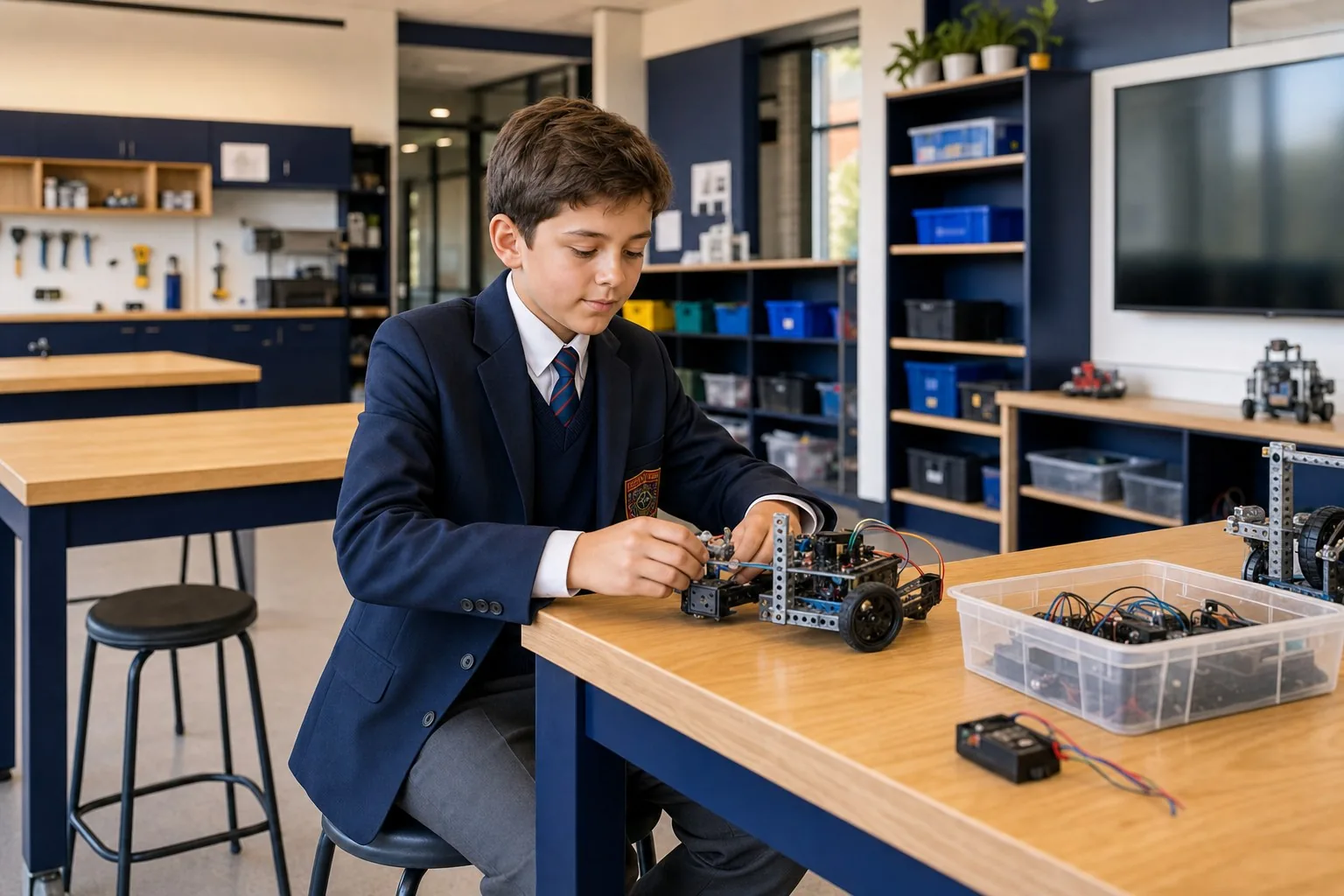
Schools need strong student imagery. It helps families picture daily life on campus. It gives a website warmth. And it makes a school feel real, not generic.
But using real student photos has become harder to manage. Consent changes. Students grow up. Families move. Photos date quickly. Marketing teams can spend hours checking who can appear where, then more time removing or replacing images later.
AI-generated student images can reduce some of that pressure when they are created responsibly. They are not a replacement for real school photography. They are another tool in the kit: useful for hero imagery, campaign visuals, section images and future content needs where privacy, consistency and flexibility matter. For school marketing teams, this is especially relevant when planning school websites that need to stay fresh over time.
No matter where your school sits on using AI-generated images today, you can still prepare for the future by asking your photographer to capture a few specific student reference and campus environment shots next time they are on site.
The pain points of traditional photography for schools
Until now, the default approach was simple: book a photographer, organise students, collect consent and capture a library of marketing images. That still matters. Real moments, real students and genuine school energy are powerful.
The challenge is that the admin and risk around those photos keeps growing, especially for younger students.
- Privacy expectations are higher. Parents are more aware of where their child appears online, and schools need to think carefully about the long life of website imagery. The increasing ease of creating lifelike deepfake videos adds another layer of concern for families and schools.
- Consent is hard to manage at scale. It can take longer to confirm who is cleared for a campaign than it does to choose the image.
- Student images date quickly. A Year 3 student in a hero image eventually becomes a Year 8 student, and the old image can start to feel stale or awkward.
- Website updates become admin-heavy. Each new page, campaign or enrolment push can trigger another round of image checks, approvals and replacements.
- There is reputational risk in tying a real student to a school forever. Schools understandably prefer not to have uniformed photos resurface years later in unrelated or controversial contexts.
These concerns do not mean schools should stop photographing students. They mean schools need more options. They also make a clear photography brief more important, which is why our earlier guide on how to brief a photographer for website photos is a useful companion to this article.
Where AI-generated images are most useful
- Generic website section imagery, such as learning, wellbeing, leadership, sport, arts, STEM and boarding pages.
- Campaign creative where the message is about a program, pathway or environment rather than a specific student.
- Placeholder or concept imagery during website planning, before final photography exists.
- Hard-to-capture combinations, such as a specific year level, uniform, location, season and activity.
- Evergreen visuals that should not become outdated because a real student has aged out of the image.
- Privacy-sensitive pages where using a real student image may be unnecessary or inappropriate.
What we have learned from testing AI-generated school images
The models are getting very good, very quickly. They can infer a surprising amount from a uniform shot, a group photo or an angled image. They can usually understand the broad idea of a blazer, tie, crest, jumper, school colours and setting.
But they still need context. The more precise the school uniform and environment need to be, the more useful your reference material becomes.
A model can mock up a uniform from separate pieces, but small details can drift. Tie angle, jumper neckline, blazer fit, crest placement, skirt length, sports uniform combinations, winter layers and how the uniform is actually worn in the real school community all matter. Those details are much easier to preserve when the model has a clear, high-resolution reference.
The best reference shots are not necessarily the most beautiful shots. They are the clearest shots.
Reference photos every school should capture for AI-generated student images
If you are already organising a marketing photography day, add a short reference-shot list to the brief. It may only take a little extra time, but it can save hours of future production work.
For each core year group and uniform variation, capture:
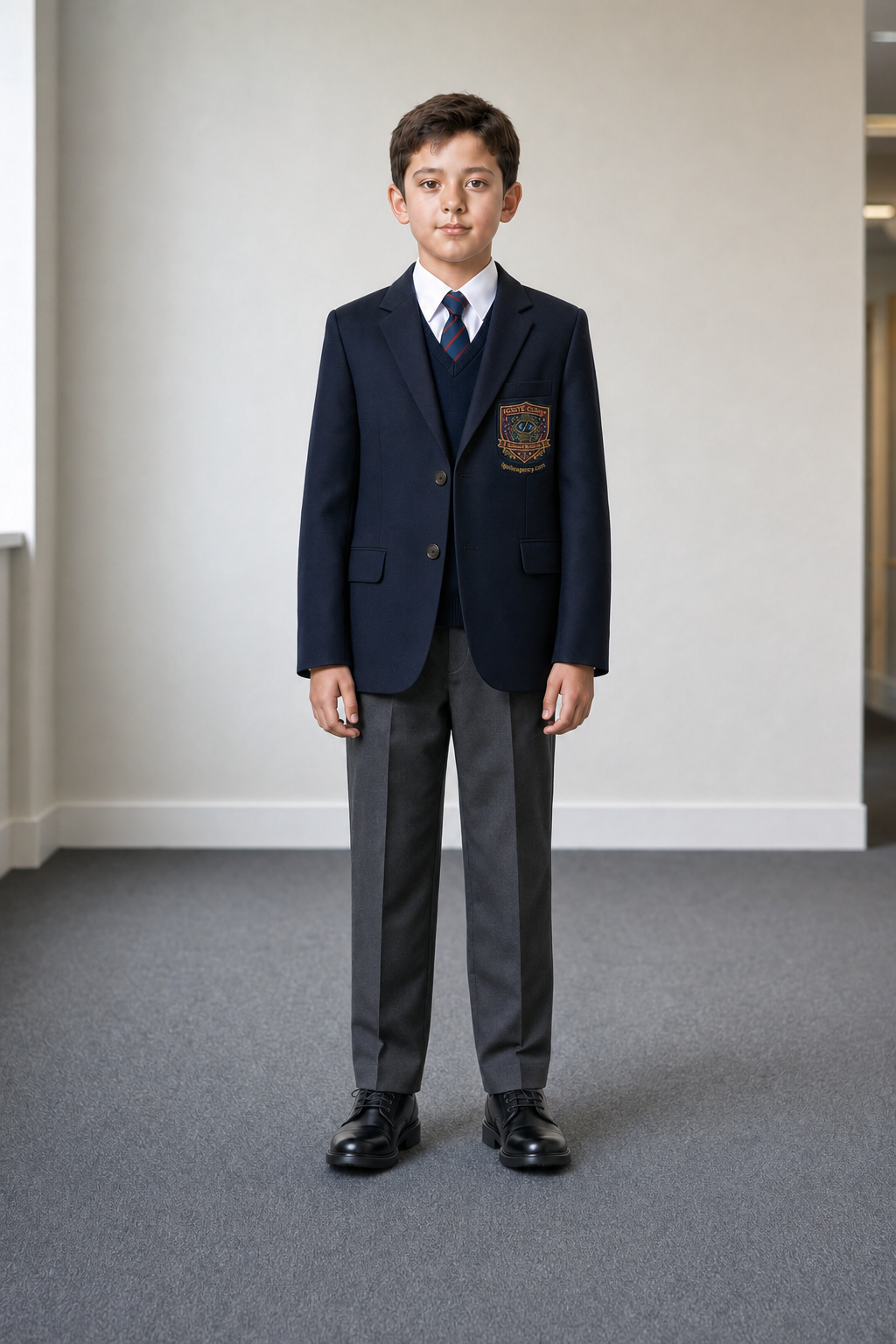
- One front-on full-body shot.
- One back full-body shot.
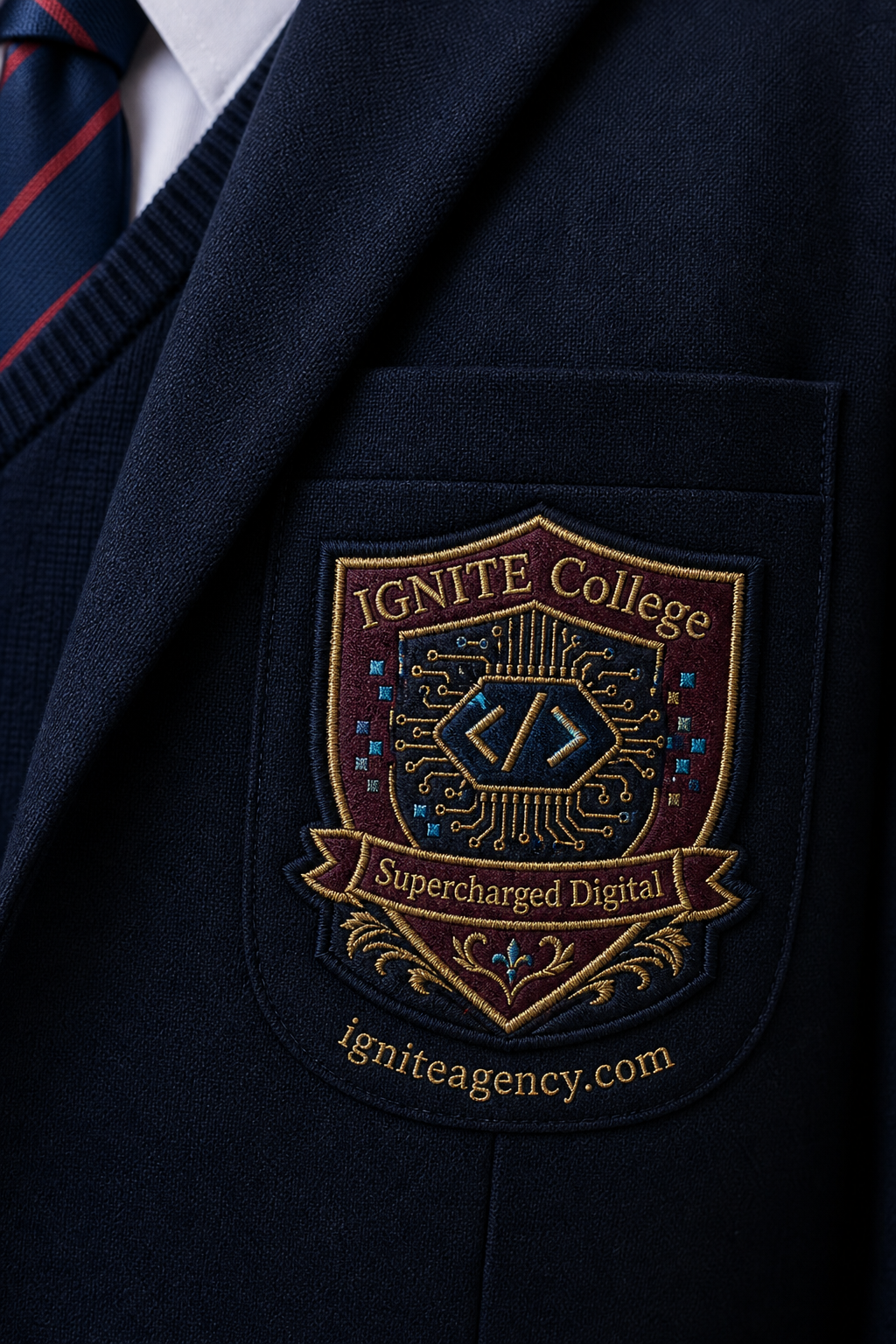
- One close-up of the embroidered crest or logo. This is usually the main giveaway when AI-generated uniform images are not quite right.
- If there are other specific details, such as a tie, badge, embroidery, buttons, fabric texture or trim, include a close-up or high-resolution shot of those details by themselves.
- Separate references for each meaningful uniform variation, such as summer, winter, sport, formal, primary, middle school and senior school.
- Separate references where uniform styling meaningfully differs by gender or presentation.
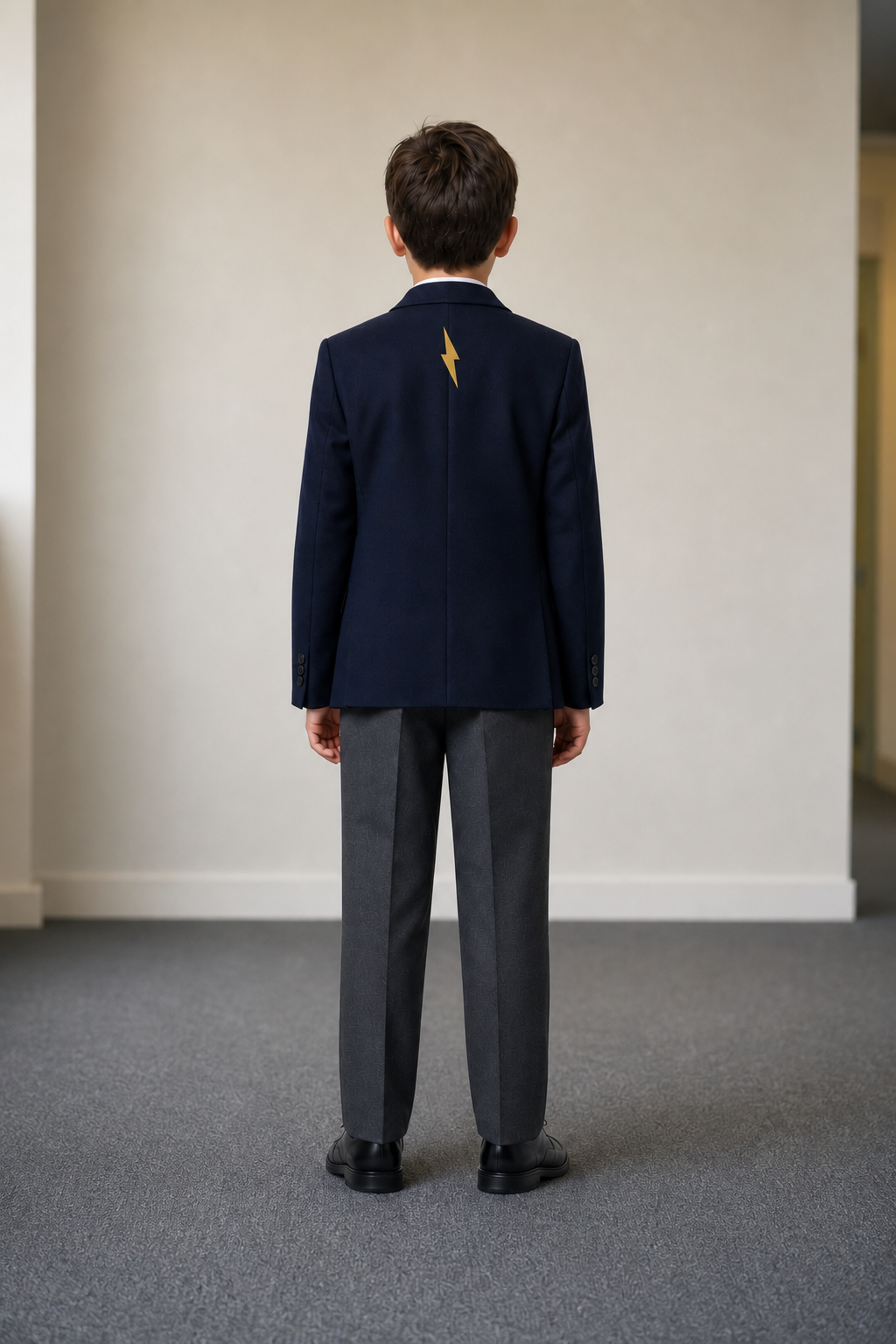
These should be boring, practical images. That is the point. Your future AI marketing agency, internal creative team or AI agent will thank you.
How to shoot the uniform references
- Use portrait orientation for full-body student references.
- Shoot at the highest resolution available.
- Use a neutral background, ideally a plain white or light wall.
- Make sure the shot is well lit, with minimal harsh shadow and no colour cast.
- Keep the camera straight and avoid wide-angle distortion.
- Capture the whole uniform, including shoes, socks, hem lengths and outerwear.
- Ask the student to stand naturally, but simply. This is a reference asset, not a hero portrait.
- For detail shots, fill the frame with the crest, tie, jumper texture, badge or embroidery so the AI model can read it clearly.
- Avoid distracting props, busy rooms or other students in the reference shot.
Capture school background photos for future AI images
While the photographer is on campus, ask them to capture simple environment shots as well.
The goal is different from normal architectural photography. You are not trying to hero a building or create a finished campaign image. You are collecting believable school environments that can later support generated student imagery.
Useful background references might include:
- A seat in a courtyard.
- A shaded outdoor path with trees, gardens or brickwork.
- A quiet library zone.
- A STEM room, art room, music room or workshop.
- A wall, corridor or entry area that has school character without becoming too identifiable.
- Outdoor spaces with usable light, texture and depth.
These background shots do not need to be perfect final images. In fact, they are often more useful when they are simple, clear and flexible. Think of them as scene ingredients.

A simple library setting gives the AI model a believable school context without needing a finished architectural photo.

Outdoor spaces such as courtyards, paths, gardens and walls can become useful background references for future campaign imagery.

Specialist learning spaces are useful to capture because they are often harder to schedule for a perfect student shoot.
How school reference photos become AI-generated student images
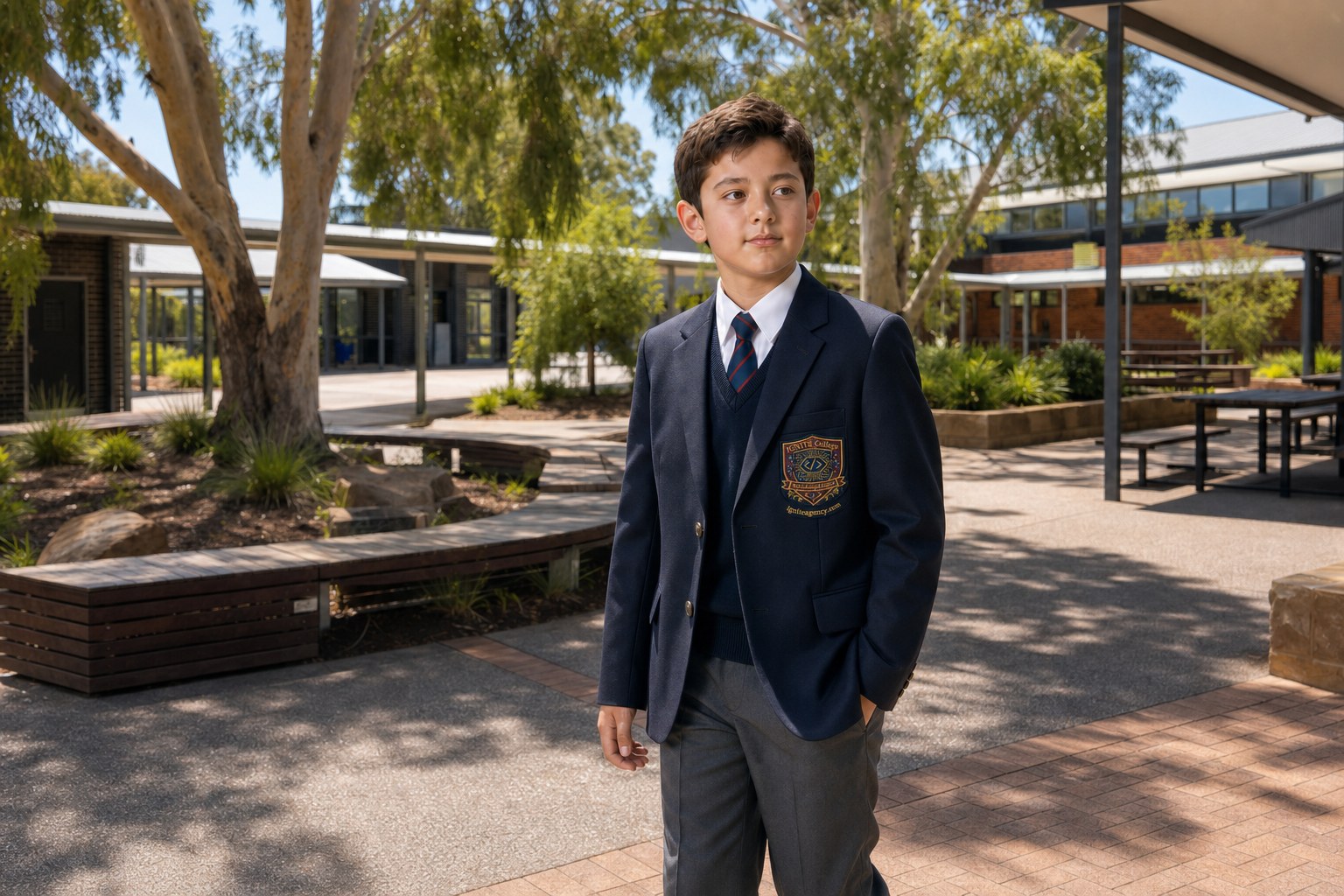
Now that you have your source images, you can upload them to a leading AI image-generation tool such as ChatGPT or Gemini. Combine the uniform and environment references with a clear description of the student, activity and composition you need. Strong source material helps the tool produce a more believable result while preserving important uniform details.
The examples below show the process in three stages: the environment reference, the combined source material and the finished AI-generated image.

The environment, student reference and uniform detail references are combined to guide the final image.


Create variations for different uniforms, year levels and student groups
AI-generated student images can also make it easier to create controlled variations from the same base scene.
For example, a school could use the same library, courtyard or classroom setting with different year levels, uniform options or student backgrounds, without organising a new photo shoot each time.
This can help schools:
- Show summer, winter, sport or formal uniforms
- Create images for different year levels or sub-schools
- Represent a broader mix of students and backgrounds
- Refresh campaign visuals more quickly
- Test image directions before committing to a final campaign
.png)
.png)
.png)
AI tools are already strong at this. At IGNITE, we have also built a simple tool to help school clients create and manage these controlled image variations.
If you would like to see how it could work for your school, contact us and we can show you a quick demo.
Build a small AI-ready school image library
The long-term value comes from organising the assets so they can be reused. This is also a simple piece of website governance: the better the source files are named, stored and approved, the easier the website is to manage later.
- Create folders by uniform type, year level, season and location.
- Use descriptive filenames, such as junior-boys-winter-front, senior-summer-dress-detail or courtyard-background-east-wing.
- Keep raw high-resolution originals, plus smaller review copies.
- Record any notes that matter, such as correct tie, optional blazer, summer hat required, sport jacket only for training or crest updated.
- Store the files somewhere your approved marketing team, agency or content partner can access later.
Is using AI-generated student imagery misleading?
Not necessarily. The important question is whether the image creates a false impression.
In our conversations to date, parents have shown far greater concern about the potential misuse of their child’s image online than about whether every student pictured on a school website is a real, enrolled student. Their priority is that the imagery represents the school honestly and does not put children’s privacy at unnecessary risk.
Schools should not use AI imagery to invent outcomes, misrepresent programs or present a generated student as a real child telling a real story. Testimonials, case studies, scholarship profiles, news stories and specific student achievements should use real people with clear permission.
For broader website and campaign imagery, constructed images are not new. Schools have long used staged photography, retouching, colour grading, models and stand-in students. AI-generated imagery is another form of constructed marketing imagery, although it brings its own production and disclosure considerations.
The practical standard is simple: use AI-generated imagery to illustrate authentic school environments and experiences, but never to mislead families about a specific person, event, program or outcome.
Governance, safety and common sense
AI-generated school imagery still needs a clear internal process. The risk is lower in some areas, but it is not zero.
- Set a policy for when AI-generated people can be used and when real photography is required.
- Avoid generating lookalikes of real students, staff or families.
- Use diverse, representative student avatars without stereotyping or tokenism.
- Check uniforms, logos and campus details carefully before publishing.
- Do not use AI images for testimonials, real student stories, news events or achievement claims unless the context is clearly illustrative and approved.
- Consider a simple disclosure approach for campaigns or pages where families may reasonably assume the image is illustrative rather than documentary photography.
- Keep source references, prompts and final approved outputs in a controlled folder so future teams can understand how an image was made.
The marketer's payoff
The benefit is not just cheaper image production. It is flexibility.
A school can brief a new website page and request a Year 7 student in winter uniform reading in the library, or a senior student in a STEM room, or a junior student in a shaded courtyard, without rebuilding the entire photography schedule around one image requirement. This becomes even more useful when the school is also reviewing broader structure, such as the decisions covered in our school website sitemap and navigation guide.
It also means your website can stay fresher for longer. When the creative needs to change, you are not starting from scratch. You are working from a structured set of uniform, detail and environment references.
Key takeaway: Take these photos
If you only take one action from this article, add the following to your next photography brief:
- Capture front, back and detail reference shots for every major uniform variation.
- Prioritise clarity over creativity for these reference shots.
- Shoot against a neutral background, in good light and at high resolution.
- Capture campus background scenes that can be used later as AI image environments.
- Organise and label the files so future teams can actually find and use them.
These are not the images that will win awards on shoot day. But they may become some of the most valuable assets your school captures.
Final thought
AI image generation is changing quickly. The tools will improve. The ethical expectations will mature. The compliance conversations will continue.
What is unlikely to change is the value of good source material. Clear uniform references, well-shot detail images and flexible campus backgrounds will make future creative work faster, more accurate and easier to approve.
For schools, the opportunity is not to replace authenticity. It is to reduce avoidable friction, protect student privacy and give marketing teams a smarter way to create the everyday imagery a modern school website needs. If a school is already planning a larger website update, this belongs in the same conversation as content, photography, page structure and the wider website work families will use to form an impression.